





With exploitdmg you can deal damage much faster that regular waitdmg
Tutorial
ExploitDMG can be used with two Modes:
– Slot Mode: Connect Main Account via Slot to the Dummy at the selected Client Slot
– CH Mode: Connect Main Account CH-based to a Dummy in same Channel automatically
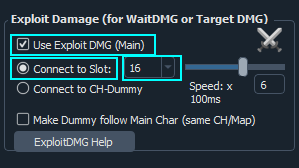
Slot Mode – 1. Setting up Main
Check the “Connect to Slot” Box
The Main Account (Attacking Monsters) needs to have WaitDMG or TargetDMG active, depending on which mode you want to use. After that, click the “Use Exploit DMG (Main)” Checkbox. Additionally, click “Connect to Slot” and select the Dummy Account Slot in the DropDown Menu in order to tell Hunt2 which Dummy Slot you want to use.
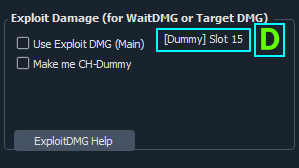
Slot Mode – 2. Setting up Dummy
Connect to Dummy
Start the Dummy Account and go ingame (same Server and CH as the Main). In this Mode the Dummy will auto-connect to the Main Account. A big, green “D” should appear on screen.
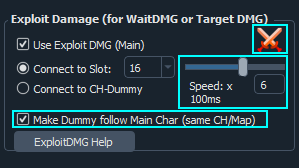
Slot Mode – 3. Follow Main
Setup further settings
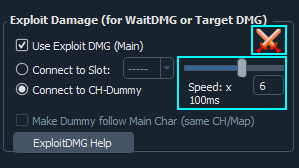
Setup your Speed. If you get kicks you probably need to lower your speed.
Also, you can optionally instruct the Dummy to follow the Main account. This works across CHs and Maps, but not across servers. If multiple mains are connected to one dummy, the Dummy will follow the main, that was connected last.
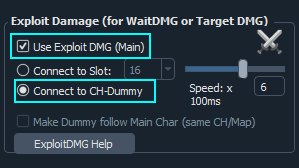
CH Mode – 1. Setting up Main
Check the “Connect to CH-Dummy” Box
The Main Account (Attacking Monsters) needs to have WaitDMG or TargetDMG active, depending on which mode you want to use. After that, click the “Use Exploit DMG (Main)” Checkbox. Additionally, click “Connect to CH-Dummy”.
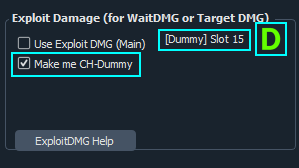
CH Mode – 2. Setting up Dummy
Connect to Dummy
Here, you need one Dummy Account for each CH that you want to use ExploitDMG. Start the Dummy Account and go ingame (same Server). Now select “Make me CH-Dummy” in order to mark this account as auto-connect to any Mains in the same CH.
CH Mode – 3. Login more Dummies
Setup further settings
In this mode you need to login multiple dummies (one Dummy per CH). Then, the Main Accounts will auto-connect after a CH-Change to the corresponding dummy.
Finally, setup your Speed. If you get kicks you probably need to lower your speed.